It doesn't matter if you have the 20GB, 60GB, or even the new 80GB PlayStation 3--you can always use more storage space. All that available hard-disk space quickly disappears once you start downloading games, demos, and HD videos. Fortunately, Sony has designed the PS3 to allow console owners to perform their own hard-drive upgrades. You can go out and select your own hard drive instead of being forced to buy an official first-party hard-disk accessory. However, giving console owners that freedom means that aspiring upgraders will need to know how to select the right hard-drive upgrade and the proper installation technique.

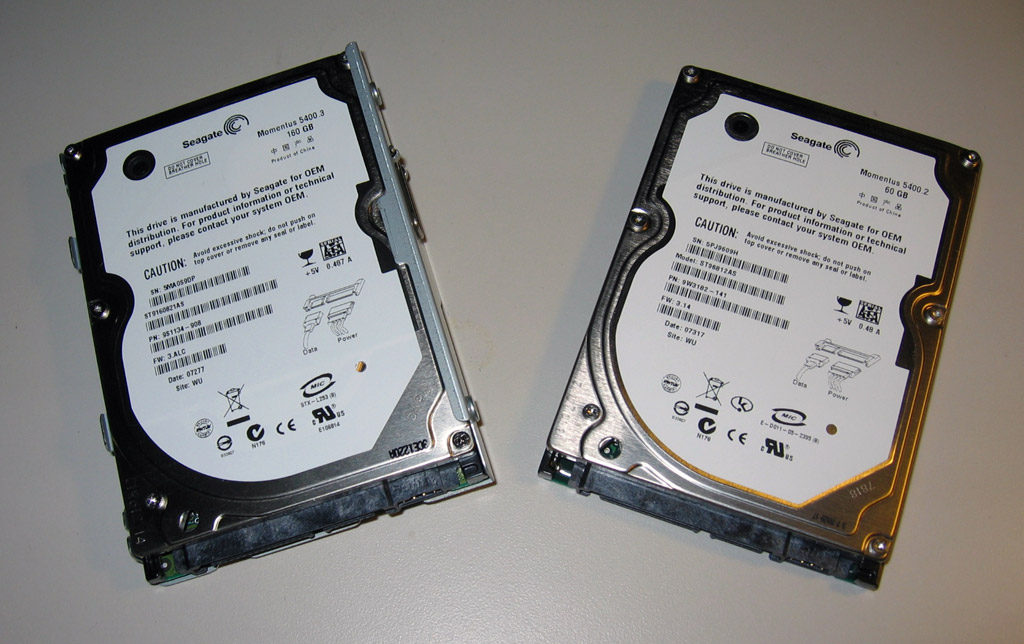
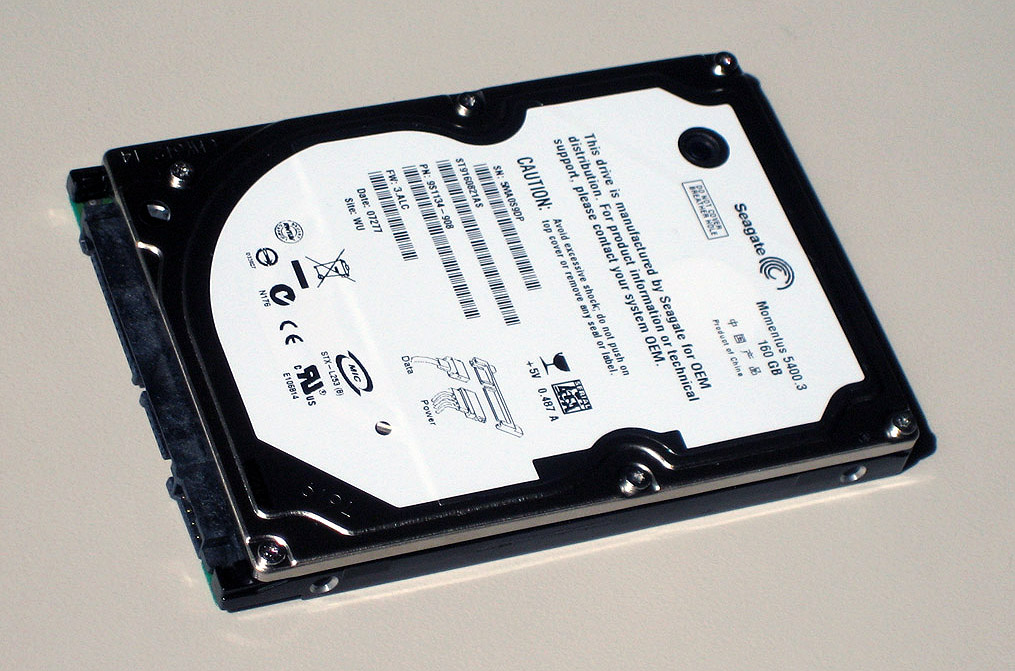
The first step to replacing the hard disk is going to the store or visiting an online retailer to pick up a new hard disk. The PS3 is compatible with just about any 2.5-inch SATA notebook hard disk. Both 5400- and 7200-RPM drives should work fine. The physical size of the hard disk is important because it has to fit the PS3's 2.5-inch drive tray. As far as storage capacity goes, it doesn't make sense to go through the trouble of upgrading unless you go big: We're talkin' 120GB, 160GB, or even 250GB.
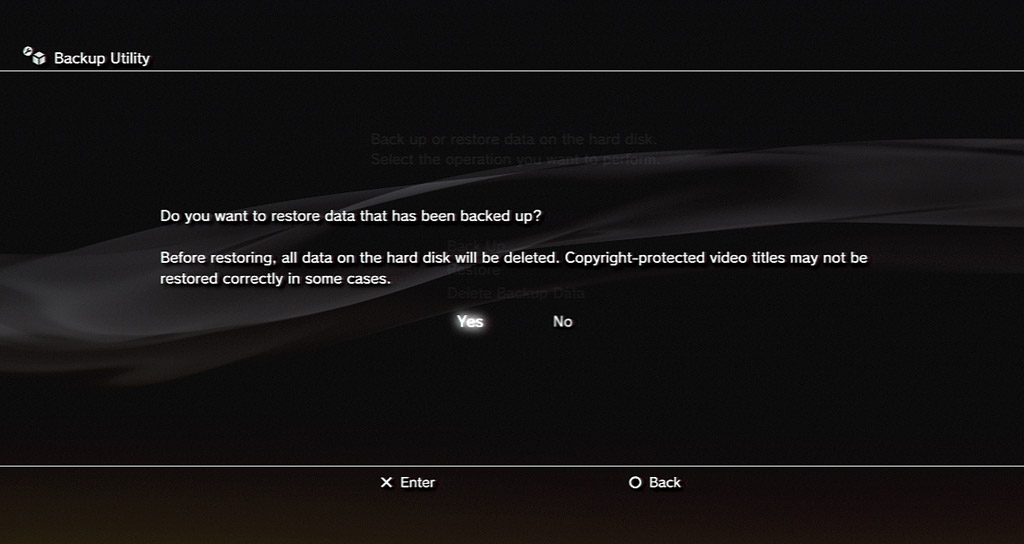
Once you have your upgrade drive, the next step is to back up the data on your current PS3 hard drive to an external storage unit. You can skip this step if you aren't attached to your music, videos, and game saves, but most of us will probably want to save all that information. The PS3 has a built-in software backup utility that can copy the PS3's hard-drive contents to an external storage device, such as a USB thumb drive or a memory stick. The removable storage device must use the FAT32 file system in order for the PS3 to recognize it. If you have an external hard drive that's formatted in NTFS, you can use the Disk Management utility in Windows to reformat the drive, but you'll need to create partitions on large external hard drives because Windows can only do FAT32 on drives 32GB or smaller.

If your storage device isn't large enough to handle a full system backup, you can selectively copy data over through the various music, photo, and game menus in the XMB. Your PlayStation Network login and system settings will remain safe on the system during the entire process. After you have your data safely backed up, you can move on to the actual hard-drive swap.

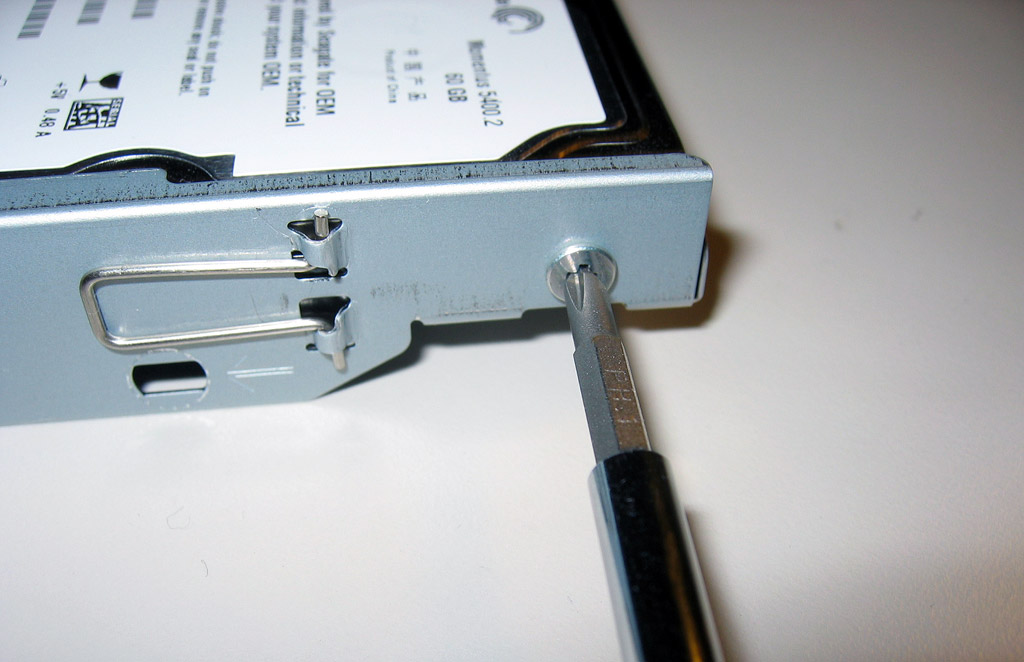
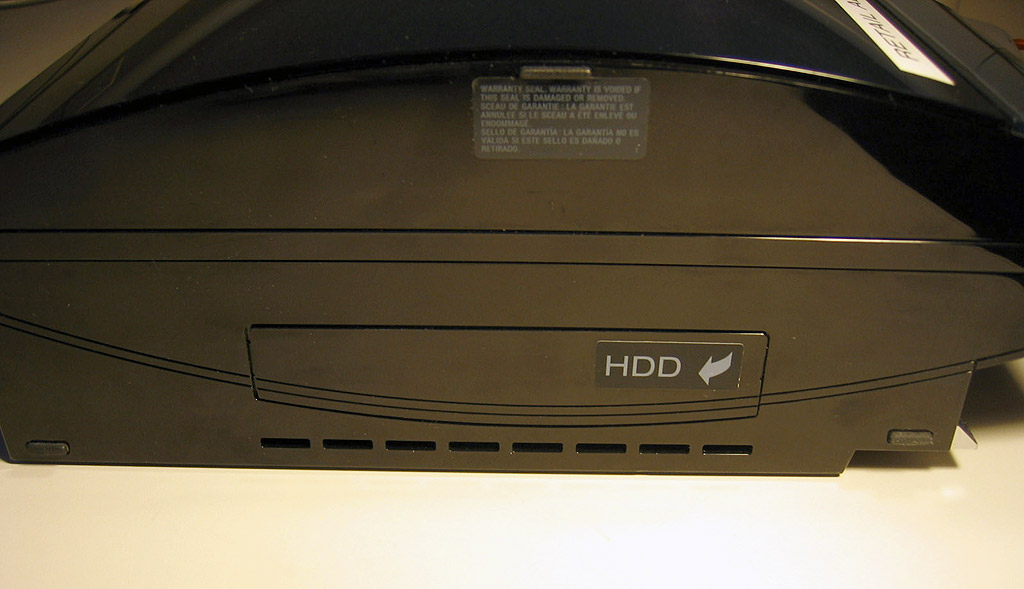
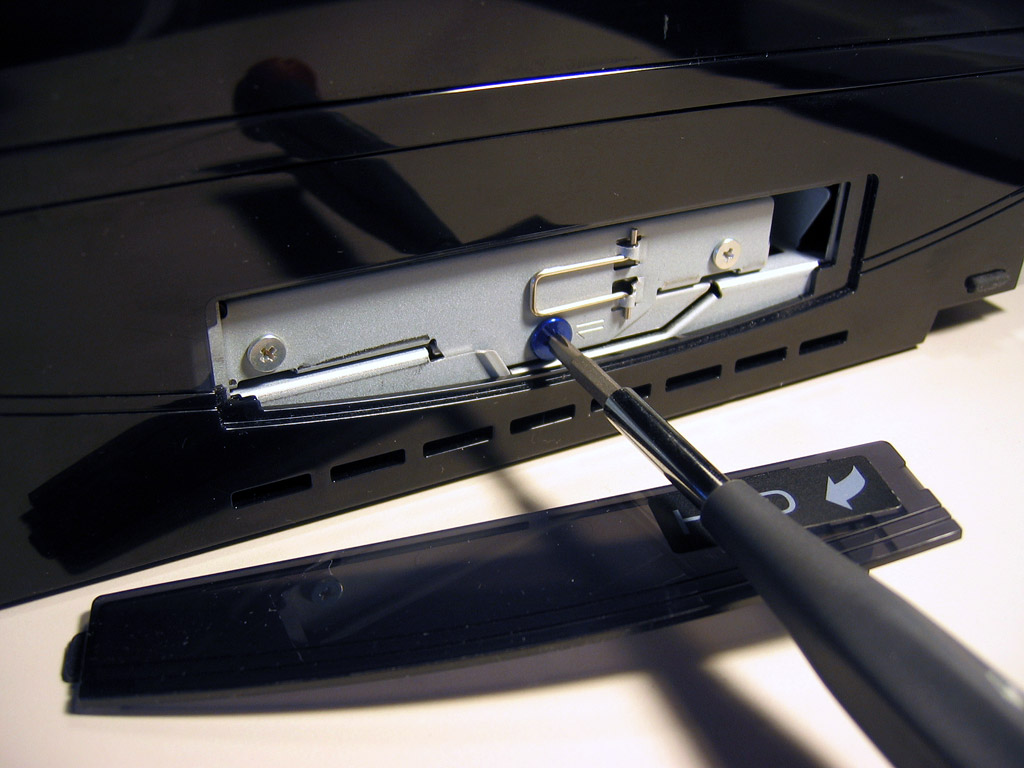
You will need a Phillips-head screwdriver to complete this part of the installation process. The PS3 owner's manual also includes step-by-step details on how to replace the hard drive, in case you need more instructions.
At this point you should have a newly upgraded PS3 and the leftover hard drive. You could try selling the old drive, but small-capacity used drives might not fetch enough money to be worth the hassle of finding a buyer. If you still want to make the drive useful, you can buy an external drive enclosure to make it into a portable storage device.

Are you ready to upgrade your PlayStation 3 hard drive, or have you already upgraded it? Share your tips or concerns in the comments below!

827 Comments

  • detectivepbert

    Posted Jul 28, 2010 12:34 am PT

    Just recently upgraded my original 40GB PS3 to 640GB. Definitely stripped the screws and needed to buy another metal caddy on e-bay. Other then that it was fine and now I can download whatever I want, and start using the photo album application.

  • the-frozen-one

    Posted Jul 22, 2010 5:00 am PT

    When I upgraded, the latest software version had a slightly different dialogue on the screens, and I had to essentially restart the PS3 as if it were the first time use before restoring the old drive.
    Other than that, this process is so so very easy.

  • the-frozen-one

    Posted Jul 21, 2010 6:04 am PT

    Re: Joker 851 - you can backup your saves - but BEWARE...some games do not allow the backing up of game saves!

  • Joker_851

    Posted Jul 18, 2010 10:57 am PT

    I need answers! First of all, how much would one of these hard disks cost? Next, I saw a deal at Best Buy where you can upgrade your old PS3 to a slim for only $50. If I do this would I be able to copy my save game data and such onto a USB and then transfer it to the slim? Someone please answer me!

  • Bcush1

    Posted Jul 15, 2010 7:52 pm PT

    Do I have to format the HD before I install it into the PS3 system or does the PS3 format it? The drive I'm installing will be a brand new Seagate Momentus 500GB 7200RPM

  • riku222

    Posted Jul 14, 2010 10:55 pm PT

    I have the original PS3....with 40 gigs and I kinda wanna buy the slim...but is it better to upgrade? Also another minus is the annoying overheating....THAT can't be fixed....can it?

  • LastPRmarine

    Posted Jul 14, 2010 8:54 am PT

    Can I use an external HDD to back-up my PS3 data or do I have to jump through some hoops to use it as back-up?

  • DA_NEZ

    Posted Jul 6, 2010 8:02 am PT

    @rystaman10 copy it onto a usb

  • finshur

    Posted Jul 1, 2010 10:25 am PT

    New Egg has the best deals on HDD's and one the bes return policies..www.newegg.com Make sure to get SATA 2.5" form factor . It will be under the HDD tab laptop hdd's and the cost differance is basically zero between a 5400 and 7200 so i'd get a 7200 even though not to noticable. http://www.newegg.com/Product/Product.aspx?Item=N82E16822145275 A great 500gig 7200rpm drive for $ 79.99 //3 day .99 cents shipping. Also it has 16megs cache as opposed to many only having 8megs.. Happy Upgrading

  • finshur

    Posted Jul 1, 2010 10:14 am PT

    Seriously guy wth are you stripping scews for?? Take the time and use the proper size philipps head and you will have zero issues. Anyway that being said i could you can get tophies just back to along with saves just resync with PSN. there is a option under game. Using 3.40 vers software.. No need to clone unless you dont have a a external HDD. Also SSD's do work see alot of video on em in PS3... There were eronerous rumors going around that you would have problems if you didnt keep it at a 5400rpm drive, those proved false.. Anyways happy gaming!

  • rystaman10

    Posted Jun 26, 2010 3:41 pm PT

    it voids your warranty doesnt it ? also i cant back up my assassins creed 2 file ?? i am half way through it but want to get a ps3 slim !! any help ?

  • Predator123

    Posted Jun 17, 2010 3:59 pm PT

    hmmm does anyone know if a 2.5" SSD will work? anyone tryed? I have a 128gb ssd that would love to find a home in my ps3.

  • jusfln

    Posted Jun 13, 2010 8:34 pm PT

    Forgot to mention fat32 doesn't like any file larger than 4gb. And I tried a NTFS external drive on his Slim PS3 with 3.30 firmware it recognised it as long as you name a folde e.g. VIDEO, PICTURE. Only if it could recognise a GAME folder.

  • jusfln

    Posted Jun 13, 2010 6:55 am PT

    To every one I found a very useful little program called CompuApps SwissKnife V3, It can FORMAT FAT32 file system up to 2TB, That's right 2TB. External drive.

  • detectivepbert

    Posted Jun 11, 2010 2:29 am PT

    Good article. I also wonder if you can clone the drive like some do when upgrading pc hard drives. If you can take the drive out of the PS3, clone it to the new drive using your PC, and then take the new drive with the clone and install it to the PS3. I imagine trophies, etc. are saved, at least if the cloning option works.

  • dokmaron

    Posted Jun 10, 2010 11:22 am PT

    good workXD

  • VlVlsectVl

    Posted Jun 10, 2010 9:24 am PT

    I upgraded about a year ago from 60GB to 500GB. I didn't have any trouble with the screws at all, and backing everything up was a breeze with a $15 SATA to USB adapter and an old hard drive. If you try this method, you have to format the hard drive to FAT32 instead of NTFS. Modern PCs will give you trouble in this department. If you don't have a flash drive capable of backing up your PS3, the adapter route is a good way to go.

  • Golberg51

    Posted Jun 8, 2010 9:32 am PT

    Can't believe I just realized I can do that, thank you GameSpot. Luckily I have some experience replacing PC's HDs, so this should be easy.

  • Race

    Posted Jun 6, 2010 1:28 pm PT

    I think my hands are bleeding from trying to get these screws out.

  • 10Iron

    Posted Jun 3, 2010 6:26 pm PT

    I have a Next-Gen PS3 slim and I installed a 500GB Seagate Momentus with 7200RPM and it worked perfectly. I must admit that I see no difference between a 5400RPM and a 7200RPM, but at least the option is there. I know before there were rumors about 7200RPM not working and a 320GB limit. These are untrue. Someone try a 1TB and let us know if it works. Happy PS3'ing...

  • fvdm_92

    Posted Jun 3, 2010 3:55 pm PT

    do you retain all your trophies and users?
    or would you have to go throught all that hard work to get it all back....?

  • guitarmike7

    Posted Jun 2, 2010 3:53 pm PT

    im thinking about this cos i only have 10GBs left on my 80GB ps3 but im worried if i F***k it up ill break it and have to buy a new ps3 any tips?

  • AngryFingers

    Posted Jun 1, 2010 4:35 pm PT

    Bah...they didn't mention what size Phillips-head screwdriver. Messed up my screws quite a bit.

  • siarhei

    Posted Jun 1, 2010 7:36 am PT

    wow, this is really handy.

  • Bahamut006

    Posted May 30, 2010 9:53 pm PT

    meow

  • calm_syrface

    Posted May 28, 2010 8:44 pm PT

    Ok i'm hearing all of this but...where can I order a new hard drive and how much of my arm and leg is it going to cost me?

  • Deepfreeze32

    Posted May 27, 2010 7:52 pm PT

    @ kingwarez3 Yes, you can sue a 320 drive, my friend did that. his works fine.

    @sgt_47, I believe any Notebook sized SATA hard drive will work, though I'd try to get a 7200 RPM drive. Faster read/write times and all that jazz. Also, I believe trophies and whatnot are tied to your PSN account (Don't quote me on that though, I'm not big on those) And I am fairly certain the PS3 can back up ALL your data provided you give it a big enough storage device, so it shouldn't be an issue anyway.


    This is all assuming those jerks at sony didn't remove this feature too. >=( /tech

  • kingwarez3

    Posted May 23, 2010 11:02 pm PT

    can you use a 320gb hard drive

  • Sgt_47

    Posted May 19, 2010 12:54 am PT

    Does upgrading delete your trophy data?

  • Sgt_47

    Posted May 19, 2010 12:53 am PT

    can anyone tell me what the exact hard disk requirements are for upgrading my 40 gig PS3. Where can I buy the Hard disks from?

  • shocor

    Posted May 17, 2010 9:29 pm PT

    Just a note for partitioning a hard drive to back up your data. I used Partition Wizard on my 1 TB Seagate external HD and partitioned off 42Gig of it (I only had a 40 Gig HD on my ps3)
    and had no problem doing it in fat32, so I don't know if they are talking about the windows program will only do 32gig or if Partition Wizard just ignors the limits, but with that everything worked beautifully. I only used a 250gig HD as I had seen before that that was all a ps3 would read regardless of the size you put in (which, after reading other sites was apparently in error)

  • GAMERKID707

    Posted Apr 18, 2010 6:42 pm PT

    i didnt know u can do this,im about to buy a terabyte ,thats like 1,000 gigs

  • Dactarus

    Posted Apr 15, 2010 2:10 pm PT

    ok,another unsolved issue. Backed up data to a FAT32, formatted, 32g thumb drive. New HDD is installed, formatted, and firmware successfully xfered from same thumb drive. I tried to restore data from same thumb drive with ps3 saying there is no back up data. Erased thumb drive, checked for FAT32, and Gig space..all ok. Swapped HDD back,backed up data,swapped HDD back to new one, tried to restore data with same issue..'There is no back up data'...?? ideas plz. Should i try to re-format new HDD then see if it reads..it was already formatted 1x after first swap and instal of new firmware. HELP!!

  • oviler123

    Posted Apr 14, 2010 3:44 am PT

    same thing, but on the slim there is a small plate on the bottom side of it, remove it and you'll find the same blue screw.

  • anuj8888

    Posted Apr 12, 2010 11:36 pm PT

    how am i supposed to do it with a slim PS3?

  • syam32245340

    Posted Apr 12, 2010 2:03 am PT

    sweet as!

  • Sweenietod

    Posted Apr 11, 2010 4:42 am PT

    trying it now

  • zeonfollower

    Posted Mar 30, 2010 11:23 pm PT

    Nice!

  • sibbsy

    Posted Mar 28, 2010 10:05 am PT

    hi does anyone no how to format my hard drive for my ps3 as people have said that it can not be done due to the size of the drive i have bought a 500gig & need to format it to fat 32 for it to work or does the ps3 convert it for you once you have pluged it back in and power it up? I need help on this asap if anyone cud help that would be very great full.

    there has to be someone that can help me out as i am well and trully stuck :-(

  • mscoxoh

    Posted Mar 26, 2010 5:14 pm PT

    Upgraded my old "fat" PS3 40gb with a 500gb HD and it worked flawlessly; didn't lose any saved games or other data.

  • Mickeyminime

    Posted Mar 25, 2010 5:39 am PT

    ......so you need to update the PS3 it self via net. I thought you just had to format the new hard drive in the PS3, and that was it =S

  • Meganon

    Posted Mar 21, 2010 6:26 am PT

    When I try to update my hard drive, it says, "Cannot start. The correct hard disk was not found." Any suggestions/tips?

  • CarlitoU

    Posted Mar 16, 2010 2:48 pm PT

    realmgs_master, fair play offering that link (http://us.playstation.com/support/systemupdates/ps3/pc_update/index.htm). Woked a charm! I used a PSP as my storage device and downloaded the update from Sony. If I can do this, anyone can. Cheers, Dude!!

  • advanracer

    Posted Mar 14, 2010 5:09 pm PT

    @the_dude_9821 IMO. Its tougher to MOD a 360 to play Burned games compared to changing a HD in a PS3's which is probably the "simplest" upgrade to date. LOL. Tech Savvy you are indeed.

  • the_dude_9821

    Posted Mar 6, 2010 7:56 pm PT

    Does Sony offer a service where you can just mail them your ps3 and a hard drive and have them do it for a fee? I consider myself to be pretty tech savvy (successfully modded 3 360s to play burned games) but I ALWAYS run into trouble when it comes to transferring important data.

  • realmgs_master

    Posted Mar 5, 2010 11:13 pm PT

    jchul0, I just replaced my 40GB HDD and installed a 320GB on the PS3 and I got the exact same error as you. Use the directions and the download in the following link.
    http://us.playstation.com/support/systemupdates/ps3/pc_update/index.htm

    Seems easy enough, but I saved the file exactly as it was suggested (filename IS case sensitive). Once I booted up my PS3 and hooked up the device I had the file stored on, I hit the Select and Start buttons at the same time and it finally gave me an option to format the new drive. After that, the rest of the stuff is pretty straight forward.

    Hope that helps. Good luck.

  • jchul0

    Posted Mar 2, 2010 2:07 pm PT

    Ive been at this @#$* since yesterday. i replaced the HDD and it asks to connect storage media with te 3.15 update. Ive used my old flashdrive, a CDRW and bought a new flash drive from radioshack and NOTHING. NO APPLICABLE DATA WAS FOUND. Ive done everything according to Sony and still the same problem. yes i made the PS3/UPDATE folder... FML. anyone have any new input to maybe help me?! please

advertisement

How to upgrade your PlayStation 3 hard drive

Find out how to upgrade the hard drive on your PlayStation 3.

Tags