While PC gamers have been enjoying online multiplayer shooters like Counter-Strike for years, SOCOM: U.S. Navy SEALs will be the very first such online gaming experience for a great number of PlayStation 2 owners. Sony and SOCOM's developer, Zipper Interactive, obviously knew this would be the case, and in SOCOM, they have constructed an online game that is surprisingly deep but extremely easy to get into, making it an excellent game regardless of whether you've played other multiplayer shooters before.
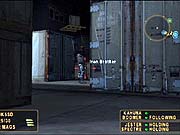
Getting online with SOCOM once you've set up your network adapter is as simple as choosing "online" from the game's main menu and then entering a user name and password. The game's 10 online maps all support two to 16 players, and each map focuses on one of three different gameplay types: demolition, suppression, or extraction. Demolition calls for the destruction of the opposing team's base using explosives. Suppression is a team-based deathmatch that ends when one of the two teams is completely eliminated. Extraction calls for the rescue of key hostages by the SEALs team. One of the game's notable online features is the ability to create "clans" with other players and then manage them in their clan's community center, which allows clan members to post messages for one another. The game also keeps track of online players' records, so you can see how you and your friends stack up against everyone else. The online action works well over a DSL connection, with little to no lag even in a full 16-player game.
While the major draw of SOCOM is certainly the game's online play component, the game does include a fairly substantial single-player campaign that consists of 12 missions set in a variety of locations around the globe. Almost all the missions have three main objectives that you must complete in order to move on to the next. The main objectives include activities such as blowing up enemy weapon depots, assassinating specific targets, rescuing prisoners, and gathering intelligence by retrieving enemy maps and laptop computers. Each mission begins with a brief overview that gives you a rundown of the situation and your objectives.
The actual gameplay in SOCOM: U.S. Navy SEALs is an exciting mix of first- and third-person shooting that has a heavy emphasis on using stealth techniques. The game's default camera view is a third-person perspective, but by pressing up on the D pad, you can switch to a first-person view. If you have night-vision goggles or a sniper rifle, you can continue to press up on the D pad to get an enhanced first-person view using the goggles or a zoomed-in first-person view using the rifle's scope. The most effective way to play is to use different perspectives depending on your situation, since moving around in tight quarters is easier from a third-person perspective, while shooting enemies is less troublesome from a first-person perspective. While having to switch perspectives may seem needlessly complicated when you first start playing, it becomes almost second nature by the time you get to the game's third mission. The only thing that's missing is a third-person night-vision perspective. While it's most likely not in the game because it wouldn't have seemed realistic, the game would have definitely been less frustrating in certain parts if it had been included--especially since a good number of the levels have you sneaking around in tight quarters in the dark, making it difficult to see enemies hidden behind objects until you're right on top of them.
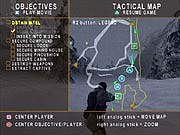
The rest of the controls in SOCOM: U.S. Navy SEALs take a bit of getting used to, since the game makes use of just about every single button on the controller and requires fairly precise analog stick control. You have the choice between two different control configurations: sure shot and precision shooter. The sure shot setup makes it so you generally only have to use the left analog stick to move and aim. The one exception is that the right analog stick moves your crosshairs up and down. The precision aim selection splits the two functions up and assigns control of your character to the left analog stick and control of your aim to the right, much like other recent console shooters. Your SEAL can jump, interact with objects, fire weapons, throw grenades, and climb ladders and objects. The precision shooter configuration is set up so you don't have to reposition your fingers in the middle of a firefight. You fire your weapon with the L1 button, aim and move with the analog sticks, reload with the R3 button, and switch to your secondary weapon with the L2 button. The one exception is if you get right next to an enemy and want to crack him in the head with your rifle butt or stab him with your knife--these satisfying moves are performed by pushing the X button. Beyond that, the game gives just you about every control option you could want to have, including the ability to go into a sneaking stance and the ability to slide down a ladder instead of climbing down it. In the single-player game, you also have to lead the other three members of your SEAL team by issuing orders using the onscreen interface or the headset that comes packed with the game.
The experience of playing SOCOM: U.S. Navy SEALs with the headset on--which allows you to hear your teammates through the earpiece and issue orders by speaking commands--is a highly immersive one. When using the headset online, you can use it to communicate with your human teammates. When using it in the single-player mode, you can give your teammates a variety of orders by specifying who you're speaking to, what you want done, and where you want them to do it. The "who" can be either the whole team or just half of it, the "what" can be actions like deploying grenades or moving to certain locations, and the "where" can be specific waypoints or even where your crosshairs are pointing. The speech recognition works extremely well--all you have to do is use the game's specific vocabulary. For instance, you can say, "Team, run to, crosshairs," in order to have your team run to the location where your crosshairs are pointed. Occasionally the game won't recognize what you're trying to say, but it's usually because you just didn't say it very clearly. In order to activate the microphone, all you have to do is press the circle button on the controller, which momentarily freezes the game so you can issue orders without being shot. Once you've issued the orders, gameplay instantly resumes. Whether you're using the headset or the onscreen menu, issuing orders is an integral part of how you play SOCOM: U.S. Navy SEALs. The only way you can get through most of the missions is by using your teammates effectively--running and gunning will usually just get you killed.
The artificial intelligence of your enemies and your teammates ranges from excellent to downright poor, depending on the situation. In one situation, we ordered a teammate to sneak up to an open doorway leading to an unexplored room. The teammate followed the order, but upon reaching the open doorway, he turned around to face the rest of the team, foolishly leaving his back exposed to whatever enemies were in the unexplored room. In another situation, we came to a spot where we could see inside of a room that three soldiers were standing around in. We lined up a headshot on the first soldier, pulled the trigger, and watched the soldier drop. The other two soldiers, though, stood around as though nothing had happened. On the other hand, you may get some very different results in the same situations--your teammate might face the open doorway and kill the enemy inside, and the other two soldiers inside the room might run away or even try to flank you. Needless to say, the AI is unpredictable, but it usually leans toward the lower end of the intelligence scale. Once you beat the game, the enemy AI increases to a higher level, although the enemy placement is nearly identical in each mission.
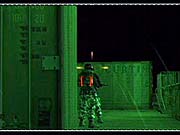
Graphically, SOCOM: U.S. Navy SEALs is a very impressive-looking PlayStation 2 game, but it has a few unfortunate visual defects. The character models used for your character and your fellow SEALs are incredibly detailed. Their faces are realistically smeared with camouflage face paint, and you can see small details like belt loops and creases on their clothing and gear. The animation of your team members is extremely realistic, especially as you creep while crouching or crawl while in the prone position. The character models used for the enemies you face aren't quite as detailed, and they don't move as realistically as your SEAL team, but they are very well done in their own right. The enemy animations do become fairly redundant after a few levels, though. Additionally, whenever you kill an enemy, he pops into a standing death animation and then falls to ground even if he was lying on the ground when you killed him. The characters also sometimes don't interact with their environments as well as they should. When throwing switches or coming up behind an enemy for a silent knife kill, the character models sometimes don't actually appear as though they are making contact with the objects in the environment. The environments themselves include lots of amazingly realistic jungle settings with tons of foliage, hills, and creeks. In most of the large open levels, you'll find that the game does employ fog to hide the level drawn-in. The draw-in distance varies from level to level, but typically you hardly ever notice it since it's so far away.

The audio component of SOCOM: U.S. Navy SEALs is solid, with an incredible array of different sound effects that really draw you in to the game. Of course, the earpiece of the headset is the big hook. While it may seem a little gimmicky at first, you'll think it's the coolest thing ever by the third level. The earpiece relays audio messages from your teammates and mission advisor, who is presumably monitoring all your activities from a remote location. When you or anyone else uses the microphone, you'll hear it chime in your ear just before and after someone speaks. If you don't have the headset plugged in, you'll just hear the through your regular television speakers. However, the audio heard through the earpiece is much more effective at drawing you into the game, since you'll be trying to listen to your men advising you of enemy positions while the sound of gunfire and other ambient noise is erupting all around you. It's not hard to hear, but the effect of focusing your attention between the sounds of the environment and the voices of your teammates really does pull you into the game. The different guns all sound appropriate to their real-world counterparts, as do the various sound effects for wind, rain, the crunching of the snow beneath your feet, and the rustling of the bushes as you creep your way through the jungle. The music, while fairly appropriate for each environment, is a little off in how it transitions from ambient tension-filled music to overwhelmingly loud action-theme music. Sometimes you won't see the enemies who are apparently being indicated by the sudden switch to action music, or you'll kill the enemies just as the music changes, causing it to awkwardly change back. The same is true for the little ditty that plays when you accomplish a goal, in that you may accomplish a goal in the middle of a firefight, and suddenly this really upbeat and inspirational music track comes on that seems terribly out of place. While the music and its sometimes annoying transitions come default, the designers have thoughtfully included in-game volume controls so you can turn the music off.
In the end, the single-player aspect of SOCOM: U.S. Navy SEALs, while certainly not problem-free, offers more exciting moments than any previous console tactical shooter. While most will undoubtedly want to play the game online, the single-player game alone offers enough reason to pick SOCOM up. It's true that the single-player mode is relatively short--the 12 levels add up to about 12-15 hours of fun the first time through. The second time through the AI does get tougher, but you'll still probably be able to blow through the game a second time in about six hours or less. So it's true that the multiplayer mode is really the biggest attraction. Those who plan to play the game online will find that SOCOM features an almost infinite amount of replay value, since just about every match you play online will be different thanks to the unpredictability of other human players. Simply put, the game works extremely well online and will certainly be enjoyed by anyone who has a broadband connection but has never tasted the world of online shooters.
