Sign on Options
Theme:

Laptop hard drives, like the one found in the PlayStation 3, take up little physical space. However, going smaller generally requires compromises. Performance takes a backseat, because manufacturers design the drives primarily for lower power consumption and heat emission. Sony likely wanted to make a smaller console and had to settle for using a space-saving laptop drive. That means we're stuck with a slow drive, and the console reminds us of it every time we install or load up and play a game. To speed things up a bit we could replace the 5,400rpm stock hard drive with an incrementally faster 7,200rpm drive. But that's the easy way out. We'd rather go the Tool Time way and slap in a next-generation solid state drive (SSD). Traditional hard drives have motors and platters that spin and move, and both of those devices take up power and generate heat. SSDs have no moving parts whatsoever--they're based entirely on NAND flash memory like the kind used in memory cards and USB storage devices. SSDs use very little power, emit far less heat than conventional hard drives, are completely silent, and provide excellent performance--if you can afford them.

Solid state drives aren't anything new; they've just been very expensive for much of their existence. A couple of years ago, 60GB SSDs sold for around $1,000. That number is far from affordable, but it was more expensive a short time before that. Like all things in the computer world, SSDs continue to drop tremendously in price, grow in capacity, and increase in performance as the technology makes its way into more mainstream electronics.

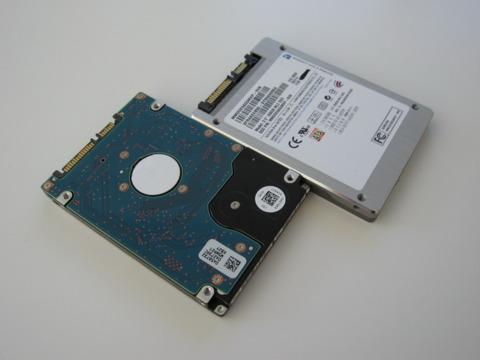
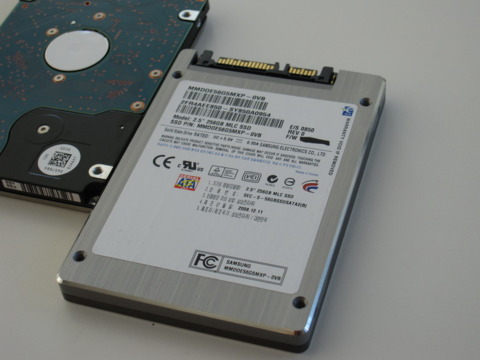
SSD on the right       Underside       Closeup      

Last year we tested the PlayStation 3 with an entry-level 60GB SuperTalent SSD. The results showed that the upgrade didn't justify the cost. Load times decreased, but install times actually went up. Nowadays, we're seeing considerably faster SSDs drop into the $100 territory, albeit at 32GB, which is on the smallish side. Spend a bit more and you can grab a 120GB drive for a hair under $300. 256GB drives scale almost linearly in price and slide in at $650-plus.

We got our hands on the 256GB Samsung MMDOE56G5MXP SSD to see how it performs in a PlayStation 3 Slim. We tested the drive in a PC beforehand and saw blistering performance. We witnessed read speeds in the 220MB/s range and write speeds ranging from 160MB/s to 190MB/s depending on the run. By comparison, we tested the stock PlayStation 3 Slim hard drive and observed 65MB/s read speeds and 48MB/s write speeds. Incidentally, the Slim's drive is considerably quicker than the drive found in our original PlayStation 3, which had 32MB/s write and read speeds.

Installing a solid state drive into the PlayStation 3 doesn't take long; we detailed the process in our How to Upgrade Your PlayStation 3 Hard Drive feature. Aside from screws that are incredibly tight and easy to strip, the process is simple and relatively painless. The SSD has normal SATA hard drive connections and is sized perfectly to fit into the PlayStation 3's hard drive tray.The process is largely the same for the PlayStation 3 Slim, except for the location of the hard drive slot.

PlayStation 3 Slim SSD Performance

(Shorter bars indicate better performance)

Game Installation Time - Minutes

Devil May Cry 4 - Stock Drive
17.9
Devil May Cry 4 - Samsung SSD
17.9
Grand Theft Auto 4 - Stock Drive
8.6
Grand Theft Auto 4 - Samsung SSD
8.8
Assassin's Creed 2 - Stock Drive
4.5
Assassin's Creed 2 - Samsung SSD
4.4

XMB to Game Menu Load Time - Seconds

Devil May Cry 4 - Stock Drive
39
Devil May Cry 4 - Samsung SSD
34
Grand Theft Auto 4 - Stock Drive
98
Grand Theft Auto 4 - Samsung SSD
87
Assassin's Creed 2 - Stock Drive
52
Assassin's Creed 2 - Samsung SSD
50

Save Game Load Time - Seconds

Devil May Cry 4 - Stock Drive
6
Devil May Cry 4 - Samsung SSD
6
Grand Theft Auto 4 - Stock Drive
15
Grand Theft Auto 4 - Samsung SSD
10
Assassin's Creed 2 - Stock Drive
22
Assassin's Creed 2 - Samsung SSD
18

Test System Setup: PlayStation 3 Slim Stock Hard Drive - Hitachi 5K500 120GB, Samsung 256GB SSD.

Performance

The game installation test results show that the Samsung SSD's ridiculously fast write speeds didn't come into play when installing games from the Blu-ray drive. Give or take a few seconds, the stock PlayStation 3 Slim hard drive performed largely the same as the Samsung SSD. The likely limitation is the speed of the PlayStation 3 Slim's 2x Blu-ray drive, which caps off at 9MB/s. A faster hard drive, SSD or not, simply isn't going to make up for it.

Write speeds are only one part of the story, because you generally install a game only once. The rest of the time, you'll be loading up saved games, waiting for levels to load, or launching games from the Cross Media Bar. The SSD excels in those instances. Grand Theft Auto IV showed tremendous speed increases both when starting the game and when loading a saved game. Assassin's Creed II and Devil May Cry 4 hardly budged in favor of the SSD when it came to saved game loads, but we did shave off a few seconds when loading from the XMB. The SSD's superior read performance doesn't nullify load times entirely, but it does help to reduce them. We're likely encountering Blu-ray drive limitations again, as the disc still needs to be accessed in spite of the game install.

Conclusion

At a cost of $650, it's hard to justify purchasing the 256GB Samsung SSD (or, for that matter, one with one-fourth the capacity and price), especially when you consider that the money could buy you two new consoles. There certainly are benefits to upgrading to a solid state drive, but we wouldn't recommend doing so until the prices are more in line with performance expectations. At this point, you're better off slapping that SSD into your computer to fully enjoy the gains.

827 Comments

  • SPBoss

    Posted Mar 27, 2011 10:02 am GMT

    Those load times are still ridiculous with a ssd, a mediocre pc could load gta in less than 40 seconds with a 7200rpm drive

  • pokerface12219

    Posted Feb 24, 2011 9:48 pm GMT

    @bfggriff
    SSDs can be great with the right interfaces like SATA 3 Gb/s and SATA 6 Gb/s; however, ps3s use SATA 1.5 Gb/s which limits the read and write speeds to 187.5 MB/s which is only slightly faster than a 7200 RPM hard drive. With SATA 6 Gb/s read speeds can be up to 750 MB/s (which fast SSDs can reach while even 10000 RPM hard drives speed max out at 200 MB/s).

  • gozyaj

    Posted Jan 11, 2011 5:58 am GMT

    SDDs are way too expensive. =(

  • AC-FAN-I-AM

    Posted Dec 14, 2010 10:17 am GMT

    just three words this is really stupid

  • cyberdejin

    Posted Dec 13, 2010 6:48 am GMT

    Do you thing 7200 rpm hardisc performs better than 5400 rpm with no side effects ?
    I will upgrade my hardisc shortly. Should I go for a 500 GB (5400rpm) or 7200 rpm ???

    Your kind help will be apreciated.

  • bfggriff

    Posted Nov 1, 2010 3:06 pm GMT

    300 dollars 4 seconds faster load time is this a joke? this is so dumb that i actually signed on for the third time ever to post my second post ever just to express myself on how rediculous this is.

  • DeathProofDelta

    Posted Oct 5, 2010 12:57 pm GMT

    Nice idea but not worththe cost.

  • amplex007

    Posted Sep 23, 2010 6:49 am GMT

    isn't it possible to upgrade the blu-ray drive to something faster than 2X? I bet that plus an SSD would yield much better performance.

  • coaltango

    Posted Jul 10, 2010 3:40 pm GMT

    basically ur just buying time or shall i say saving time by buying an expensive ssd

  • F-14-D_TOMCAT

    Posted Jun 10, 2010 5:18 am GMT

    For less than 90 $ I bought a 640 GB hdd for my Ps3 and Iam very satisfied, so I would say 'No thank you' to a 650 $ 256 GB SSD.

  • gopal07

    Posted Jun 7, 2010 3:23 am GMT

    seems like another advertisement to make new technologies popular, why would any1 buy something like this for that much money to get 3-5 secs reduced loading times ? buying new games from those bucks will be rather more useful.

  • LancerVI posted May 28, 2010 4:55 pm GMT (does not meet display criteria. sign in to show)

    LancerVI

    Posted May 28, 2010 4:55 pm GMT (hide)

    You want fast load times?

    Build a computer!

    Oh sure, I have a 360, Wii and Ps3, but my gaming is mostly done on my PC.

    Intel Core i7 920 @ 4.0 Ghz
    Asus P6T Deluxe V2
    6 GB Corsair Triple Channel DDR3 1600
    ATI Radeon 4870x2 2GB
    2xOCZ 60GB Vertex SSD's in Raid 0
    Custom Koolance system in Lian-Li Case

    Bad ass my friends. Bad Ass!

    Check your six,

    Lancer VI

  • gamer082009

    Posted Mar 4, 2010 12:20 am GMT

    Seriously, regular hard drives will do the trick.

  • colonialpikachu

    Posted Jan 18, 2010 4:07 pm GMT

    Sony should have let people upgrade the Blu-Ray drive in the PS3 with a computer's drive rather than make people scramble to speed-pinch with these capped out hard drive speeds.

  • SicklySunStorm

    Posted Dec 30, 2009 12:00 pm GMT

    Jeez guys..... some people are so impatient. If you don't remember what it was like to put a cassette tape into a machine, pressing play to load it, then going downstairs to your dinner for an hour.... only to return that hour later and the cassette has crashed and you had to start all over again.... if you remember those days, you'll be laughing when people cry that a game takes 3 seconds longer to load unless they change something in their machine.

    Big

    Whoop

    We're so lucky these days to have the games we have loading as quickly as they do, it's that simple.

  • TENGILL29 posted Dec 29, 2009 8:22 am GMT (does not meet display criteria. sign in to show)

    TENGILL29

    Posted Dec 29, 2009 8:22 am GMT (hide)

    Wait... it takes 8.6 sec to load the GTA4 main screen and 15 sec to load a saved game?
    Man you could... make dinner while you wait.
    Thank good i have a PC.

  • ColdfireTrilogy

    Posted Dec 25, 2009 11:44 pm GMT

    @terror_ninja both drives are SATA .... IDE and SATA are connection and bus types not HDD types. Both a SSD and a HDD can be SATA. "From all that, id still go with a SATA because its not a huge difference and I could easily purchase another 500GB for less than a 500GB SSD."

  • aarontwhitehead

    Posted Dec 24, 2009 9:24 am GMT

    So this comparison is missing the 7200 rpm speeds. I think i would buy a couple of games and slap in a 7200 rpm drive rather than the SSD for only a few seconds of difference.

  • terror_ninja

    Posted Dec 12, 2009 4:43 pm GMT

    From all that, id still go with a SATA because its not a huge difference and I could easily purchase another 500GB for less than a 500GB SSD.

  • goldenpipes

    Posted Dec 5, 2009 9:12 pm GMT

    well it doesnt suprise me that the SSD didnt perform as well as people might think. u have to remember that the Bus for the HD in a ps3 is only SATA not SATA2 which has a throughput of 3.0gb/s

  • snooker8th

    Posted Dec 3, 2009 7:43 am GMT

    From those performance figures it seems there is very little benefit to buying this drive.

    I have a 500gb \$100 (Australian) Samsung in mine and I find the ps3s load time is not bothersome in the slightest.. the music loads significantly faster than from the Xbox 360 hard drive.

    You can also buy an unofficial adapter that lets you plug the HD and run the 3.5" drives from your own power and faster, up to 1.5tb etc.

  • Leori_7

    Posted Dec 2, 2009 7:00 am GMT

    to me ...loading time is time where i can rest a bit..zoom out from the intense battlefield in MWF 2 ...hahaha...but...dont load too long....lolz...or i might fell asleep....

  • AlfaxD_Centauro

    Posted Dec 1, 2009 7:53 pm GMT

    @Lordborg909

    Wrong choice, at least I can have technical issues and I will regret to get that thing.

  • GEOYA

    Posted Dec 1, 2009 4:53 pm GMT

    I Really dont mind loading that takes long. as long as the loading times are not every 5 mins lk that game Leasuire Suit Larry. I Put a 500g in my NEXT GENCONSOLE AKA PS3 and i got over 50 movies 20 games and still a Grip of memory left.. Gotta Love SONY..

  • ijdow

    Posted Dec 1, 2009 4:26 pm GMT

    i wonder, how much time youd save in the life span of your ps3? maybe an hour? not worth it, i put a 1TB drive in and its fine

  • TheLemonGelati

    Posted Dec 1, 2009 4:04 pm GMT

    waltzink
    Not to mention my older PS3 is backwards compatible, while my brothers Slim is not.

  • HardCor1981

    Posted Dec 1, 2009 1:08 pm GMT

    Hmmmm....buy 10 PS3 videogames or save 5 seconds a week in load times. Tough decision.

  • waltzink

    Posted Dec 1, 2009 12:23 pm GMT

    this sort of makes me glad i have one of the older PS3s! honestly, i've had it well over a year now, and the load times and install times are great. my parents have a sony blu-ray standalone player, and my PS3 loads discs in about 1/3 of the time. love it!

  • Toysoldier34

    Posted Nov 30, 2009 11:28 pm GMT

    well since the 2x bluray drive speed seems to be the weak link over the hard drive, wouldn't it make more sense to get a better optical drive first? can that be replaced or does the PS3 only read the specific one it came with? cuz if that can be replaced than you may see more results from the disk drives. Also if you take the disk completely out, what about the load time and stuff for games that are downloaded and totally on the hard drive. I think then it would make a big impact what your hard drives speed is since its the sole factor. If anyone knows more than I do I would be happy to hear it.

  • NihilisticNinja

    Posted Nov 30, 2009 6:15 pm GMT

    SSDs are known for their super fast random access times (no moving parts) so random I/Os and non-sequential reads/writes. This is NOT the kind of load you'll be experiencing when trying to reduce load times for video games (caching large textures etc.) Under this load scenario (sequential reads/writes), mechanical harddrives are much closer to SSDs in performance.

  • hardstor

    Posted Nov 30, 2009 4:51 pm GMT

    it seems everyone here is reading this in some kind of vacuum. the performance of ssd's is known to be suspect across a variety of operating systems and file systems. i have no idea of the ps3 internal specs, but i guarantee that the filesystem and operating system has not been designed for an ssd. It's a different architecture and certain optimisations need to be configured in to make it work better. A firmware update from sony might fix this, but i wouldn't hold my breath. How a review can be done without this sort of consideration is beyond me.

  • blancobo

    Posted Nov 30, 2009 4:43 pm GMT

    As they mention, it was done before. This article is a remake of an old one and it does not demonstrate any conclussive data to justify the expense when HDDs are so much more affordable than the ridiculously expensive SSD's.

    Looking at the technology, SSD's should have been there a long, long time ago... it is just Capitalism expressing itself.

  • crunchb3rry posted Nov 30, 2009 4:41 pm GMT (does not meet display criteria. sign in to show)

    crunchb3rry

    Posted Nov 30, 2009 4:41 pm GMT (hide)

    Wow, the PS3 must be a real dog under the hood if it can't take advantage of a SSD. Personally, I would rather load times increased if only to get all the crap off my existing HDD. Why must every game install damn near a gigabyte of swapfile data when the 360 does not need to and runs games at almost the exact same speed in regards to loading?

  • ValtielSuccubus

    Posted Nov 30, 2009 4:00 pm GMT

    You will not get my monies.

  • lowkey254

    Posted Nov 30, 2009 3:34 pm GMT

    ssd's are too expensive for me. According to the numbers they're not really worth it. When ssd's have are widely used and are less expensive I'll consider the swap.

  • blnter posted Nov 30, 2009 2:42 pm GMT (does not meet display criteria. sign in to show)

    blnter

    Posted Nov 30, 2009 2:42 pm GMT (hide)

    can i install ps3 game hard disk?do you know ?
    please say me

  • Ubermensche

    Posted Nov 30, 2009 2:39 pm GMT

    SSD's are only really worth it for high end PC Gaming.

  • Wula_

    Posted Nov 30, 2009 2:29 pm GMT

    So basically its a feature to get for people that have more money then they can spend. For the rest of us that have to actually manage our money. Its not worth it for a few more years.

  • Kevu

    Posted Nov 30, 2009 1:10 pm GMT

    My brother has always sounded so excited for these SSD's to be showin up cheap for his PS3. With results like the ones in this article that keep coming up, I can't see how anyone can be super excited to throw down the money to replace the stock drive in their PS3. Who knows though, maybe I'm missing out on Life in those 4 extra seconds it takes to load my Assassin's Creed 2 save...but I'm bettin I'll be happier WITH the \$650 bucks I save. That may just be me. Happy to see them working on the tech though. Maybe next gen.

  • Zain-Midori

    Posted Nov 30, 2009 12:34 pm GMT

    well me personally iam happy with mi ps3 fat so far i got a 350 gig for it on black friday iam just waiting for the terabyte drives to come out hopefully by next year

  • xXZak-ataKXx

    Posted Nov 30, 2009 11:13 am GMT

    honestly the installation time doesnt bother me much,and all the games that i own are fast loading games as is. Plus you only hafta install once. So not worth the money

  • Zoomer30

    Posted Nov 30, 2009 11:07 am GMT

    Not worth it and I would be worried about:

    A. Lifetime of the SSD Drive (the clusters ware out much faster than a normal HDD)

    B. Asynchronous read/write times which could cause games to crash.

  • jer_1

    Posted Nov 30, 2009 10:54 am GMT

    Massive waste of cash here.

  • StarvingPoet

    Posted Nov 30, 2009 7:18 am GMT

    I don't think you understand the situations in which SSDs become cost effective.

    They are only really useful in high-access static database scenarios - for example, the database cluster that controls all the environmental variables for a weather modeling system. Or one that controls all the static data in a large MMO cluster. When dealing with high-write scenarios - like anything involving a cache (i.e. anything on an OS boot drive) - you are better off using a high-rpm disk. Put in a 7,200 rpm drive and get a nice 25% time reduction across the board. Not to mention the reduced life-cycle of SSD technology compared to magnetic media.

  • Iemander

    Posted Nov 30, 2009 6:44 am GMT

    This proves it, upgrading consoles is infinitely more expensive than upgrading computers, simply because RAM is not upgradeable in consoles, and people have to resort to things like this SSD.

  • hikayu16

    Posted Nov 30, 2009 6:42 am GMT

    from the last benchmark gamespot did , any1 would have guessed that gamespot know darn well the bluray limitation . it could only be reasonable that the next report would have included something like : PS home , downloadable games or bluray vs downloaded game like warhawk or burnout paradise . or even something as simple as heat output or power consumption . instead , they put in what essentially the same test . come on , gamespot !!! dont be lazy .

  • hellpolice

    Posted Nov 30, 2009 6:30 am GMT

    Hmm...seems Sangsung wants as much of the pie as it can grab out the current console war, they saw this and set the Solid State price over the 600 range.

  • rubdanielrub

    Posted Nov 30, 2009 5:10 am GMT

    i was thinking about upgrading my HD, now i will definity go with more space than "speed."

Subscribe to GameSpot's YouTube Channel