Grudge Match: SLI vs CrossFire
Nvidia's GeForce 7900 GTX SLI vs. ATI's Radeon X1900 XTX CrossFire. Who comes out the victor?

The ATI Radeon X1900 XTX CrossFire and Nvidia GeForce 7900 GTX SLI dual video card setups represent the pinnacle of gaming-video-card technology. Both setups require bleeding edge motherboards and power supplies to function, so don't think that you can buy two of each card and be on your merry way. You're likely going to have to upgrade your motherboard to an SLI- or CrossFire- certified motherboard. Then, if you actually want your system to turn on, you're also going to have to buy a beefy 550 watt or greater power supply. If you can pay more than $1000 for the video cards, another $200 for the motherboard, and an extra $100 for the power supply, prepare yourself for gaming nirvana.
All told, the barrier to entry is enormous; but once you're there and running your games at 1920x1080 with 4x antialiasing and 16x anisotropic filtering, any regrets you might have had about spending a small fortune will be thrown out the window. We're sure that one of these setups offers a better experience, however. The two could differ in terms of raw performance or the subtleties of image quality depending on the game. Either way, if you're going to lay down the smack for the best performance, we're going to make sure you get it.
GeForce 7900 GTX | Radeon X1900 XTX | |
| Core Clock | 700/650MHz | 650MHz |
| Memory Clock | 1600MHz | 1550MHZ |
| RAM Size | 512MB | 512MB |
| Pixel Shaders | 24 | 48 |
| ROPs | 16 | 16 |
| Vertex Shaders | 8 | 8 |
| Texture Units | 24 | 16 |
| Manufacturing Process | 90nm | 90nm |
| Transistor Count | 278M | 384M |
Who's the king of the roost--Nvidia's SLI or ATI's CrossFire? No one test could tell us this answer, so we decided to run five of them. We also assembled a spread of image-quality tests to go along with the raw-performance numbers. Read on to find out who gets to take home the chickens -- ATI or Nvidia.
F.E.A.R.
Image Quality
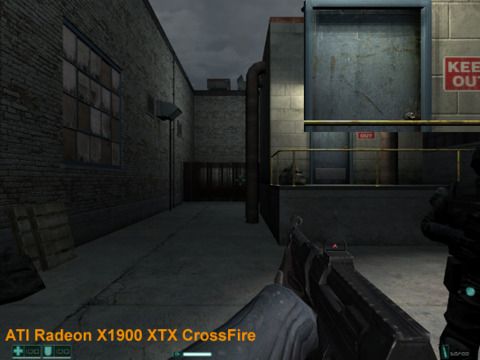
Without a doubt, F.E.A.R. is one of the most demanding games out on the market. We tested the game at 1600x1200 with soft shadows on, which automatically disables antialiasing, regardless of the video card. You'll have to decide what you want more, but we'd go with soft shadows every time. Eliminating a few jaggies with antialiasing is nothing compared to realistic shadows.
Both sets of cards rendered the game very well, and we'd be hard-pressed to tell the difference between the two. Even when zoomed in, the two setups produce nearly identical images.
Performance
Without a doubt, the GeForce 7900 GTX SLI setup takes the lead. With all settings cranked to their maximum at a resolution of 1600x1200, the 7900 GTX takes a commanding 20 percent performance lead. Even at lower resolutions, the Nvidia setup maintains its lead.
Verdict
Both setups deliver excellent image quality, and we'd be hard pressed to pick one over the other. But when it comes to brute power, the GeForce 7900 GTX SLI setup walks away the clear winner in this test.
System Setup:
AMD Athlon 64 FX-60 CPU, Asus A8N32 SLI Deluxe, Asus A8R32-MVP Deluxe Motherboard, 1GB (512MB x 2) Corsair XMS Memory, 160GB Seagate 7200.7 SATA Hard Disk Drive, Windows XP Professional SP2.
Graphics Cards: GeForce 7900 GTX, Radeon X1900 XTX.
Graphics Drivers: ATI Catalyst 6.2, Nvidia ForceWare 84.17.
Half-Life 2 Lost Coast
Image Quality
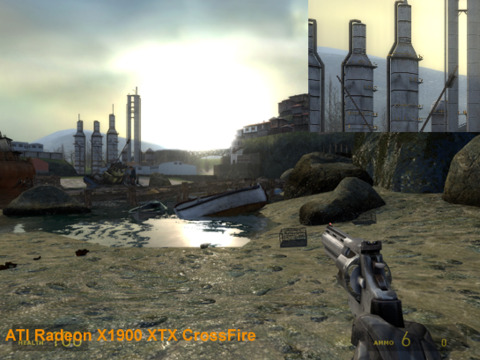
It seems like we're going to have a difficult time choosing which card wins the honors based on rendered output. We cranked up both cards to 1600x1200, switched all the settings to their maximum, and (for giggles) cranked the antialiasing to 4x and the anisotropic filtering to 16x.
The images differ slightly due to inconsistent lighting, and the antialiasing implementations differ a bit. Overall, we're not likely to pick one picture over the other.
Performance
We could hardly believe the results when we saw them, but Nvidia's GeForce 7900 GTX SLI seems to be CPU-limited at 1600x1200, with 4xAA and 16xAF. We triple-checked the numbers and visually ascertained that Half-Life 2 was indeed running with all of its features enabled and functioning. To push the rendering load onto the video card, we punched the GeForce 7900 GTX SLI up to 2048x1536, with its special SLI 8xAA mode and 16xAF, and even then, we managed to pull off an average of 50 frames per second.
Verdict
With near-similar image quality, and the performance crown going to Nvidia, we're calling the GeForce 7900 GTX SLI back in for another victory.
System Setup:
AMD Athlon 64 FX-60 CPU, Asus A8N32 SLI Deluxe, Asus A8R32-MVP Deluxe Motherboard, 1GB (512MB x 2) Corsair XMS Memory, 160GB Seagate 7200.7 SATA Hard Disk Drive, Windows XP Professional SP2.
Graphics Cards: GeForce 7900 GTX, Radeon X1900 XTX.
Graphics Drivers: ATI Catalyst 6.2, Nvidia ForceWare 84.17.
Quake 4
Image Quality
Like the other tests, we cranked the settings all the way up to 1600x1200, with 4xAA, 16xAF, and high quality all around. It looks like we're staring at identical sets of pictures. If there are differences, they're small enough for us not to care. 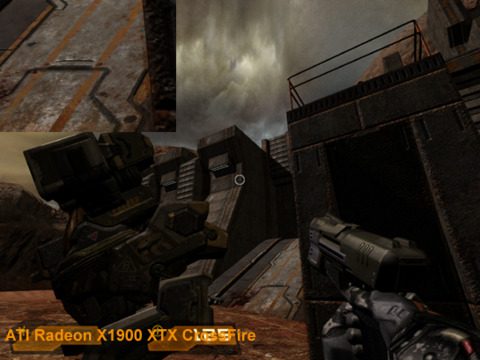
Performance
The performance crown in games made by John Carmack historically belongs to Nvidia. It seems that this trend isn't changing anytime soon. The GeForce 7900 GTX SLI setup walks away with a solid 10 percent lead in both tests.
Verdict
Need we say more? The GeForce 7900 GTX SLI easily gets our nod with respect to performance. Image quality, once again, doesn't play much of a factor.
System Setup:
AMD Athlon 64 FX-60 CPU, Asus A8N32 SLI Deluxe, Asus A8R32-MVP Deluxe Motherboard, 1GB (512MB x 2) Corsair XMS Memory, 160GB Seagate 7200.7 SATA Hard Disk Drive, Windows XP Professional SP2.
Graphics Cards: GeForce 7900 GTX, Radeon X1900 XTX.
Graphics Drivers: ATI Catalyst 6.2, Nvidia ForceWare 84.17.
Splinter Cell Chaos Theory
Image Quality
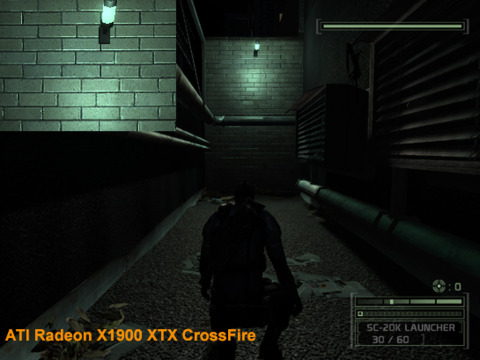
If you want to enable Shader Model 3.0 in Splinter Cell Chaos Theory, you have to give up antialiasing, regardless of the video card. The same as with F.E.A.R., we'll take the extra-fancy rendering over antialiasing. We cranked the game up to 1600x1200 with 16xAF, and then tried to find a bright level, which poses some difficulty in a game that lives and breathes on creeping around in the dark with night-vision goggles.
The pictures differ slightly in lighting levels, but this was about as close as we could get with respect to brightness. We suspect that the Nvidia cards look a bit grainy specifically because of the extra light cast onto the bricks. We're sure that the ATI cards would look the same if they had the same light levels.
Performance
ATI's Radeon X1900 XTX CrossFire squeaks out a win in Splinter Cell Chaos Theory at both resolutions.
Verdict
With equal image quality, ATI manages to win by performance with a narrow margin.
System Setup:
AMD Athlon 64 FX-60 CPU, Asus A8N32 SLI Deluxe, Asus A8R32-MVP Deluxe Motherboard, 1GB (512MB x 2) Corsair XMS Memory, 160GB Seagate 7200.7 SATA Hard Disk Drive, Windows XP Professional SP2.
Graphics Cards: GeForce 7900 GTX, Radeon X1900 XTX.
Graphics Drivers: ATI Catalyst 6.2, Nvidia ForceWare 84.17.
3DMark06
Image Quality
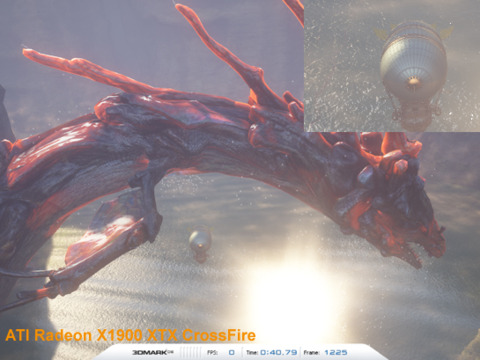
The architectural benefits of the Radeon X1900 series really shine when you start to combine antialiasing with high-dynamic-range rendering. We compared images from the Radeon rendered at 1600x1200 with 4xAA and 16xAF, while the Nvidia setup could only run at 1600x1200 with 16xAF. Nvidia's cards are not able to run antialiasing with certain high-dynamic-range titles. As for the images, they speak for themselves. ATI's output is superior simply because it can apply antialiasing, thus making all of the edges smooth.
Performance
Both setups perform identically, unless there are those among us that can visually differentiate between a single percentage-point of difference. The Radeon machine walks away with an easy victory once we enabled antialiasing, since 3DMark06 does not output a result for the Nvidia setup as it cannot run the test.
Verdict
Once we enabled antialiasing, ATI swept the field with 3DMark06. Nvidia's implementation cannot compete if you want both HDR rendering and antialiasing at the same time.
System Setup:
AMD Athlon 64 FX-60 CPU, Asus A8N32 SLI Deluxe, Asus A8R32-MVP Deluxe Motherboard, 1GB (512MB x 2) Corsair XMS Memory, 160GB Seagate 7200.7 SATA Hard Disk Drive, Windows XP Professional SP2.
Graphics Cards: GeForce 7900 GTX, Radeon X1900 XTX.
Graphics Drivers: ATI Catalyst 6.2, Nvidia ForceWare 84.17.
The Big Picture
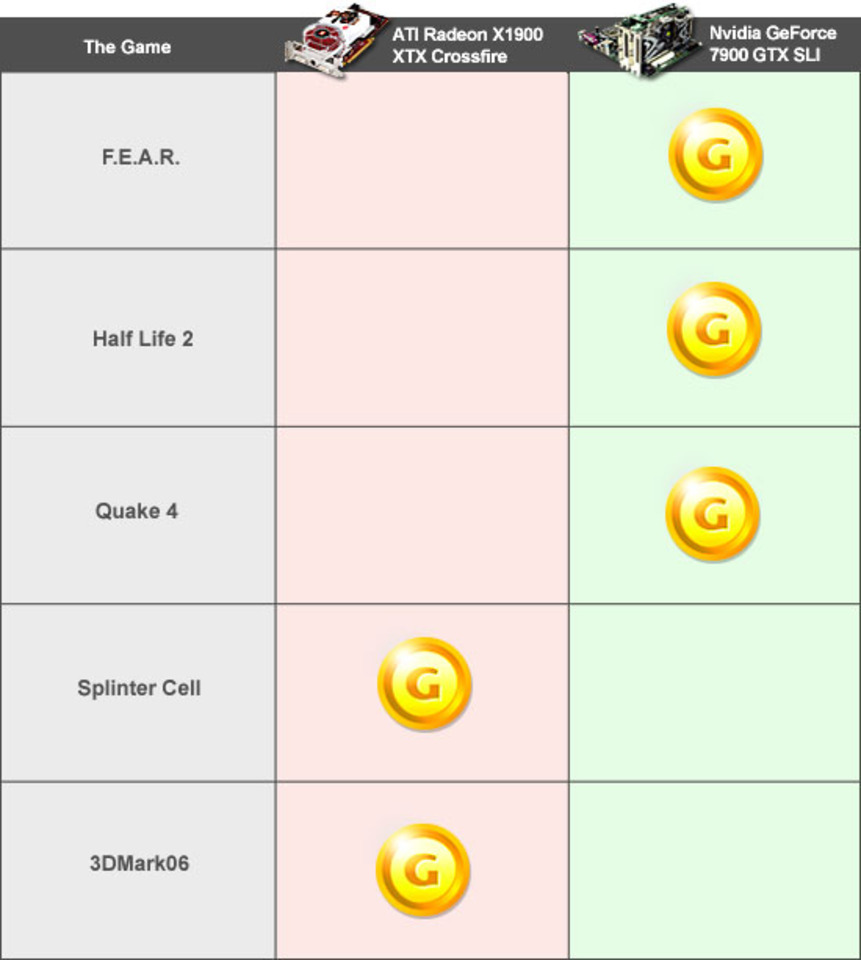
The Winner: Nvidia GeForce 7900 GTX SLI
We see that Nvidia wins three tests, while ATI wins two. It's not a decisive victory--the overall results show us how evenly matched these powerful setups are. We're sure that if we kept adding games to the comparison, our verdict would ping pong back and forth between ATI and Nvidia. However, in these five tests, Nvidia walks away the winner.
Keep in mind that Nvidia's GeForce 7900 GTX cannot render certain games with both antialiasing and HDRL enabled at the same time. As we showed in 3DMark06, the Radeon X1900 XTX CrossFire's ability to perform both of these functions at the same time improved image quality greatly. The list of HDRL games isn't long at the moment, but it will keep growing.
If you play on a 30" LCD that supports resolutions of up to 2560x1600, antialiasing won't be of much use if you want to maintain a decent frame rate with all of the eye candy turned on. On the other hand, if you're still using a 19" LCD with a maximum resolution of 1280x1024, you might not need two video cards. When it comes to upgrading your computer, remember to build evenly-- there's no point in spending $1200 on a pair of video cards if you're still using a $300 monitor.
System Setup:
AMD Athlon 64 FX-60 CPU, Asus A8N32 SLI Deluxe, Asus A8R32-MVP Deluxe Motherboard, 1GB (512MB x 2) Corsair XMS Memory, 160GB Seagate 7200.7 SATA Hard Disk Drive, Windows XP Professional SP2.
Graphics Cards: GeForce 7900 GTX, Radeon X1900 XTX.
Graphics Drivers: ATI Catalyst 6.2, Nvidia ForceWare 84.17.
Got a news tip or want to contact us directly? Email news@gamespot.com
Join the conversation